Search DU CTLAT Blog

Tuesday, February 19, 2013

FREE Webinar: Copyright Clearance Center


Copyright Clearance Center
 
Technology makes it easy to use and share copyrighted content; how can you make sure obtaining copyright permissions is just as easy?
From course management systems to e-reserves to distance learning, technology has made it easier than ever for everyone on your campus to use and share copyrighted content. With this technology comes numerous benefits, but it also brings a potential downside — ensuring your faculty and staff are getting the necessary copyright permissions.
Copyright Clearance Center's (CCC) Annual Copyright License can play a major role in your copyright compliance program by offering:
Convenience — Gives your faculty and staff the freedom and confidence to distribute content from millions of publications in online courses, distance learning, CMS, class handouts and more
Cost savings — Provides operational efficiencies by significantly reducing the time and costs of searching for, obtaining and managing copyright permissions
Peace of Mind — Ensures your institution has the copyright license coverage it needs to keep pace with the rate at which content is being shared
Contact CCC today for more information
A CCC Licensing Consultant would be happy to discuss and evaluate your copyright licensing needs and determine if the Annual Copyright License is right for your institution. They can be reached at licensing@copyright.com or 800-982-3887, option 3, or visit www.copyright.com.
FREE Webinar
Attend an informational session on the Annual Copyright License and get insight into the license and how it can improve and streamline your copyright permissions process campus-wide.
February 26, 2013
1:00 PM ET
Register Today!


222 Rosewood Drive
Danvers, MA 01923


Share/Bookmark

Early Bird Deadline and Added Speakers - Conference on Excellence in Gateway Course Completion


Conference on Excellence in Gateway Course Completion
April 14-16, 2013
Indianapolis, Indiana
 
Visit The John N. Gardner Institute Website for
Full details:
 
Plenary Speakers:  
Freeman A. Hrabowski, III, President, University of Maryland, Baltimore County
Katherine J. Denniston, Deputy Director, Division of Undergraduate Education, National Science Foundation
 
Featured Sessions:
 
MOOCs, Analytics, and Badges - Technology and Its Implications for Gateway Courses
 
Julie Little, Vice President, Teaching, Learning, and Professional Development, EDUCAUSE
George Mehaffy, Vice-President for Academic Leadership and Change, American Association of State Colleges and Universities
 
Transforming Remedial Education By Delivering it as a Co-Requisite with Gateway Courses
Stan Jones, President, Complete College America
Tristan Denley, Provost, Austin Peay University
Susan Gabriel, Associate Professor, Community College of Baltimore County - Essex
 
PreConference Workshop:
 
Weighing Risk & Reward: Using Analytics to Move From Prediction to Intervention
Facilitated by John Fritz, Asst. VP for Instructional Technology and New Media at University of Maryland, Baltimore County
 
35 Concurrent Sessions: 
 
 
Visit this link for concurrent session titles
 
Register Online Today (Early Bird Deadline Ends 2/28/13):

Click here to register for the conference at the early bird rate. 
Plan to join us!
 
For more information about the conference, contact us at conferences@jngi.org.
 
Sincerely,
 
Sara
 
Sara Stein Koch, Ph.D.
Institute Fellow
John N. Gardner Institute for Excellence in Undergraduate Education
 saraj@jngi.org

 jngi-letterhead


John N. Gardner Institute for Excellence in Undergraduate Education | PO Box 72 | Brevard | NC | 28712

Share/Bookmark

MakeUseOf Article: Ditch Your Desktop! Turn Your Smartphone Into A Desktop Replacement

http://www.makeuseof.com/tag/ditch-your-desktop-turn-your-smartphone-into-a-desktop-replacement/?utm_campaign=newsletter&utm_source=2012-02-19

By Kannon Yamada
smartphone as desktop replacementIf Christian’s tablet experiment piqued your interest in ditching your PC, then you should know that a smartphone will perform the same function. You only need a handful of additional software and accessories.
This article gives a run-down of the hardware, accessories, and software that users can use to replace their desktop with a smartphone. Not all the parts and software in this list are required. You can get away with just one or two of them. It also includes some information on hardware compatibility. Most, but not all phones can replace your desktop.
smartphone as desktop replacement

The Hardware

Without the following hardware, it may be difficult using your smartphone as a desktop:
  • A smartphone with Android, or iOS, preferably capable of outputting video. Most modern Samsung phones, the Nexus 4 and any phone with a micro-HDMI video output can mirror its video onto an HDMI-capable monitor. Pictured below is a micro-HDMI port.
smartphone as desktop
  • Correct cable for connecting your phone to your monitor. Virtually all of these only work with HDMI. For Samsung that’s an MHL connector, for SlimPort phones, that’s a SlimPort connector. The iPhone requires a proprietary device to work with HDMI. Pictured below is a MHL adapter.
smartphone as desktop
  • For connecting to video, four basic technologies exist: (1) The iPhone 4S uses a proprietary video adapter; (2) The Nexus 4 uses a Slim Port adapter; (3) Many phones have a micro-HDMI; and (4) Samsung phones frequently have MHL connectors.
  • If you have Android 1.5 to 2.3, you may require a special Bluetooth keyboard. The only manufacturer that I’m aware of, currently producing Android keyboards with legacy compatibility, is Freedom Input. iPhones, fortunately, work with pretty much any Bluetooth keyboard around.
smartphone as desktop
  • Bluetooth, for Android devices without USB host mode. The host mode allows your handset to use USB devices. However, it wasn’t implemented until Android 4 and even then, it’s a crapshoot whether or not your phone will have the required drivers.
  • Host mode also requires an On-The-Go cable (OTG). OTG cables sell for cheap at Amazon. If you don’t know what an OTG cable is, let Erez enlighten you.
  • HDMI-equipped monitor.

The Accessories

The most important desktop accessory is the keyboard. In fact, a keyboard singularly distinguishes between the mobile and desktop experience. It also dramatically increases productivity. After all, who in their right mind composes an essay on a smartphone touchscreen?
There exist two kinds of keyboards: Bluetooth and USB. Out of the two, Bluetooth equipped wireless keyboards pair far easier with Android and iOS devices. USB devices couldn’t work on Android until Ice Cream Sandwich (4.0) and, unfortunately, even many ICS phones omitted USB support.
Therefore, if you want a keyboard, check if your ICS phone supports “USB host mode“. If it doesn’t, a Bluetooth keyboard is your best bet. As mentioned above, older implementations of Android should use a Freedom Input keyboard.
smartphone desktop replacement
A phone stand: Phone stands keep your mobile in an upright, readable position. They can be purchased cheaply on Amazon and Ebay. They’re also ridiculously easy to build yourself. Take for example the template phone stand below, via Instructables:
smartphone desktop replacement
Cardboard phone stands possess the advantage of being inexpensive and eco-friendly. They’re also easy to put together. It took me about ten minutes to cut my own from the template above.
smartphone desktop replacement
Problems with multiple USB devices: For those seeking to use a wired keyboard while charging, you might have problems. Using multiple USB devices simultaneously may require USB host mode and a powered USB hub.

The Software

I highly recommend browsing through MakeUseOf’s directory of some of the best software available on Android and iOS.
Word processing: There’s a variety of office productivity apps that can approximate offerings on the desktop. Opinions on which software reigns supreme varies, although I personally recommend King Office for Android, because of its feature set and light system requirements. For those with iPhones, QuickOffice Pro offers one of the best experiences. If you perpetually have online access, you may want to consider Google Drive, which features both an all-in-one cloud backup and office suite.
Music: Spotify is probably the best music player on iOS, although opinions vary. For Android, I suggest Pandora or GrooveShark.
Photo editing: I prefer Aviary for its hipster filters and ability to add ironic fashion accessories to animals and grandparents. It’s available on both iOS and Android. Other photo editors worth mentioning are PicShop and the baked-in photo editor available in Android 4.0+.
smartphone as desktop replacement
Social: Aside from the Facebook app, there’s a lot of good social apps, such as Google+ and Twitter. If you haven’t tried it already, give Falcon Pro a go for Twitter on Android. For iOS, try the official client.
Pin Websites to Your Launcher: We all know what an embarrassment the Facebook app is on Android. Fortunately, you can bypass this by going directly to their site from your home screen.
Watch Movies: MX Player offers one of the best video experiences on Android. iOS has It’s Playing, as well as many others.
Play Games: Adam Dachis explained how to turn your Android or iPhone into a tiny emulator. Android, however, remains the king of emulated gaming.

Conclusion

Turning your smartphone into a desktop doesn’t take much hardware, software or money for that matter. The cables themselves cost very little, except on the iPhone, and the software is mostly free. To turn my phone into a functional desktop (and I screwed it up by buying an MHL adapter instead of a SlimPort adapter), I only had to get a Bluetooth keyboard and a SlimPort adapter.
For anyone who wants to save space in their apartment, or simplify their life, ditching the desktop and the laptop just got much easier.


Kannon Yamada

A tech journalist and political scientist, with a BA in journalism and an MA in international affairs, Kannon's main interest is using technology to survive the global recession. Follow him at his Blog.

Share/Bookmark

Support DU SOAR Leaders by purchasing their calendar for $10.00!


Support DU SOAR Leaders by purchasing their calendar for $10.00.

Contact Monica White or any SOAR Leader to purchase your calendar today!!!

504-816-4374 (mwhite@dillard.edu) RH 214

 
Monica White
Coordinator of Campus Tours and Special Events
Office of Recruitment, Admissions and Programming
Division of Student Success
504-816-4670 (main office)
504-816-4374 (direct line)
504-816-4895 (fax)


Share/Bookmark

ICPSR Updates - February 2013


Attached is updated data on research from the ICPSR.


New Additions


Updates


Note: Additional SAMHDA studies may be available though they are not listed in this email/web site announcement.


--

Lynn Strong

Director, Undergraduate Research

Human Subjects Protection/IRB

Dillard University

Ensuring students more than a degree.

PSB 250

2601 Gentilly Blvd.

New Orleans, LA  70122

T:  504-816-4446

lstrong@dillard.edu

 
http://twitter.com/#!/@DUUndergradRes


Share/Bookmark

Monday, February 18, 2013

Dillard University Dining News February March 2013


Senior Citizen’s Day: Discounted Lunch $4.39 February 20th

"Explore China" Special Menu @ Lunch: February 20th

February BDay Celebration: February 22nd

-Birthday Sign Up: February 11th - 21st

"Healthy Choice Thursday" Menu Selections: February 28th


!!Dining Deals!!


Purchase your $67 Meal Cards (11 Punches) or $155 Meal Cards (25 Punches)

Sold Monday-Friday.

Call 504.816.4553 for details.

Valentine’s Special Offer: 15% off Faculty/Staff Meal Card Purchase


February 11th - March 11th


Grill 155


Hot Plate Specials: Monday-Friday 11a-1p Only $5.69

Power/Value Menu: Tuesday-Thursday 10:30a-3:30p $1.00-$1.39

Share/Bookmark

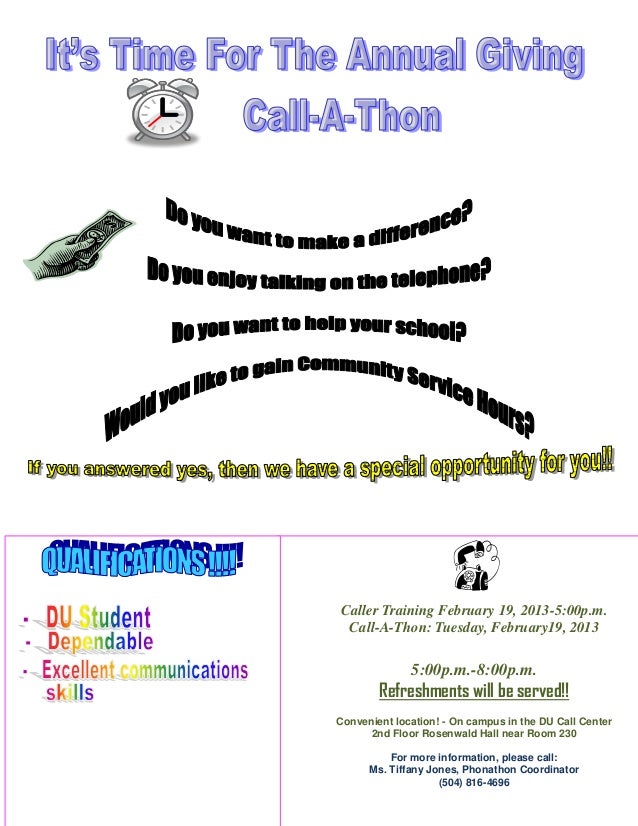
Dillard University Annual Giving Call-A-Thon February 19, 2013

http://www.slideshare.net/ccharles/dillard-university-phonathon-february-2013?utm_source=ss&utm_medium=upload&utm_campaign=quick-view


Share/Bookmark

Academic Impressions Webcast Seried: Academic Chair Online Training Series: What Every Academic Chair Needs to Know


February 20 & 27, and March 6 & 12, 2013
1:00 - 2:30 p.m. ET
 
 
header splash
 
Learn to help raise needed funds, develop precise budgets, manage conflicts, and develop and evaluate faculty more effectively.


Whether you are a faculty member with a desire to advance your career toward academic administration or you are an experienced academic leader, this four-part series will help you to manage faculty more effectively, develop precise budgets, handle conflict appropriately, and raise needed funds.
 
Brochure

SESSION DESCRIPTIONS
These sessions are designed for both experienced and novice academic leaders, including: chairs, division heads, coordinators or other administrators who are interested in learning more about the following:
  • Advancement and Fundraising | February 20
    Strategies for teaming with your advancement office to work with potential donors and to showcase your department and college
  • Planning and Resource Allocation | February 27
    Steps to develop, manage, and prioritize your department budget
  • Communication and Conflict Management | March 6
    Ways to resolve conflicts between faculty, students, and staff
  • Faculty Development and Evaluation | March 12
    Methods for recruiting, hiring, retaining, developing, and evaluating faculty
View the complete agenda.


UPCOMING EVENTS
Engaging Faculty in Student Learning Assessment
February 27 - March 1, 2013
Charlotte, NC
Student Mental Health and Campus Risk Management
June 17 - 19, 2013
Milwaukee, WI

Supporting Adjunct Faculty
February 6, 2013


REGISTER OR PURCHASE A RECORDING
 
Register online, or call 720.488.6800. Register your institution for a single site connection and an unlimited number of people can participate.
Not available on these dates or at these times? You can also add these events to your training library by purchasing CD recordings of the live webcasts.
Questions? Call us to help determine if this event is right for you.
 
facebooklinkedintwitter


Copyright © 2012 CR Mrig Company. All Rights Reserved.
4601 DTC Blvd., Suite 800 | Denver | Colorado, 80237 | info@academicimpressions.com


Share/Bookmark